

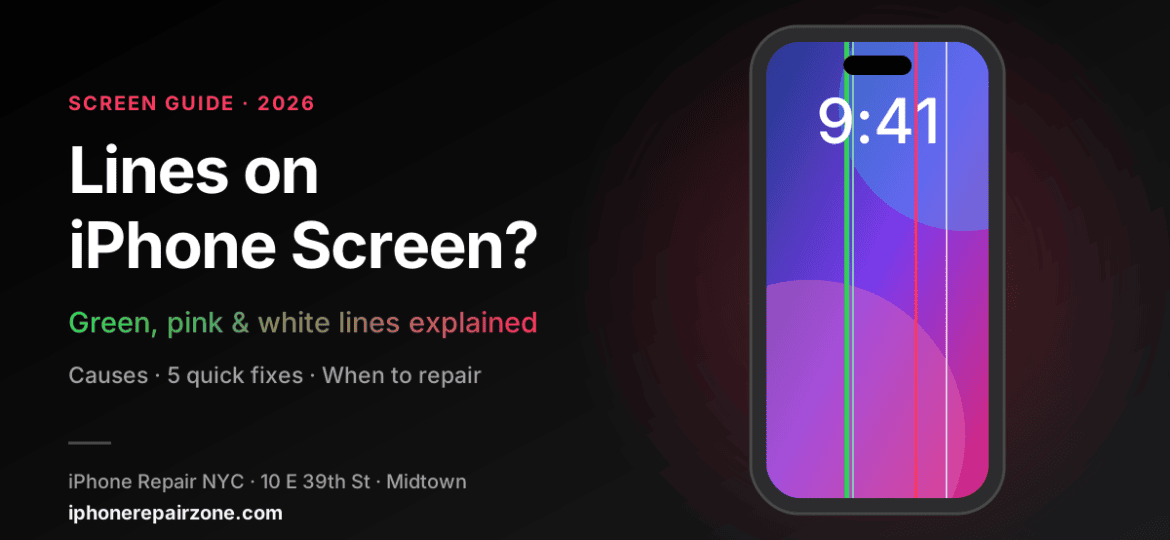
One thin line.
Big question.
Green, pink, or white lines on your iPhone screen? Here is what they mean, what you can fix at home, and when it is time for a real repair.
You pick up your phone and see it: a thin green or pink stripe running down the display. Lines on iPhone screen are one of the most searched iPhone problems in the U.S. right now, and for good reason. They can show up after a drop, after an update, or on a brand-new phone.
The good news? Not every line means your screen is ruined. In this guide, we explain the common causes, walk you through five quick fixes, and show you exactly when a screen replacement makes sense. We also cover the recent reports from new iPhone 18 Pro owners.
Why Lines on iPhone Screen Are Trending in 2026
In late September 2026, some early iPhone 18 Pro owners shared photos and videos of green and pink lines on their displays. As a result, searches like “green line on iPhone screen” and “iPhone 18 Pro screen lines” jumped across the country.
However, the full picture is still unclear. According to a roundup of iPhone 18 Pro issues, the line reports remain unconfirmed, and drops or pressure have not been ruled out. Apple has not commented on them. Meanwhile, Apple did fix other early bugs, such as Face ID freezes and a touchscreen freeze, in iOS 27.0.1.
So, if you see lines on a new iPhone, update it first. If the lines stay, contact Apple while your phone is still under warranty.
What Causes Lines on iPhone Screen?
Lines usually come from one of four sources. The color and the way the line behaves can tell you a lot.
Green line
Often a damaged OLED panel or a loose display connection. Very common after a drop, even when the glass looks fine.
Pink or purple line
Usually points to pressure damage inside the OLED layer. It may start small and slowly grow wider.
White or gray lines
Can come from a software glitch or a faulty display cable. Sometimes they flicker on and off.
Lines plus touch problems
Lines with ghost touches or dead zones often mean water damage or a failing display assembly.
The main causes, in plain words
- Physical impact. A drop can crack the OLED layer under the glass. You may not see any cracks on the outside.
- Pressure. Sitting on your phone in a back pocket can bend the panel. Tight cases can do this too.
- Software bugs. A new iOS version can sometimes cause display glitches. These usually disappear after a restart or an update.
- Water or moisture. Liquid can reach the display connector and cause lines, flickering, or touch issues.
- Low-quality replacement screens. A cheap aftermarket screen from a past repair may fail over time.
Is It Software or Hardware? A Quick Test
Before you spend any money, try this simple test. Take a screenshot while the lines are visible. Then open the screenshot on another device, or send it to a friend.
| What you see | What it means | Next step |
|---|---|---|
| Lines appear in the screenshot | Likely software | Restart and update iOS |
| Lines do not appear in the screenshot | Likely hardware | Screen inspection needed |
| Lines move, flicker, or change color | Possible loose connector | Try a force restart, then get it checked |
| Lines grow wider over days | OLED damage is spreading | Book a repair soon |
In short, a screenshot captures what iOS is drawing. If the line is not in the image, the problem lives in the display hardware itself.
5 Fixes to Try for Lines on iPhone Screen
Try these steps in order. Most of them take less than a minute.
- Force restart your iPhonePress and release Volume Up, press and release Volume Down, then hold the Side button until the Apple logo appears. Apple explains it step by step in its force restart guide.
- Update iOSGo to Settings > General > Software Update. Apple often fixes display bugs in small updates, like iOS 27.0.1.
- Remove the case and screen protectorA tight case can press on the display. A bubbled protector can also look like a line.
- Check display settingsTurn off True Tone and Night Shift for a moment. Then adjust brightness and see if the line changes.
- Back up your dataIf the line stays, back up to iCloud right away. A failing screen can stop working without warning.
Important: Do not press on the line or try to “massage” it away. Pressure can spread the damage across the whole OLED panel.
When Lines on iPhone Screen Need a Repair
If the lines survive a restart and an update, the display is most likely damaged. In that case, a new screen is the only real fix. You should book a repair if:
- The line does not show up in a screenshot.
- The line appeared after a drop or after sitting on the phone.
- Black spots, flicker, or touch problems appear next to the line.
- The line is getting bigger.
Also, if your phone recently got wet, read about Face ID problems after a drop. Display and Face ID damage often show up together.
Apple Repair vs. a Local Repair Shop
If your iPhone is still under warranty or AppleCare+, start with Apple. On a new phone with no damage, lines on iPhone screen should be covered. You can check your options on Apple’s iPhone repair page.
Out of warranty, however, the price adds up fast. For example, Apple lists U.S. out-of-warranty screen service at $329 for iPhone 18 Pro and $379 for iPhone 18 Pro Max. A trusted local shop can often do the job faster and for less, especially on older models.
iPhone screen repair prices at our Midtown shop
Have an older model? See the full list on our iPhone screen repair cost page, or find your phone on the iPhone models page.
What Happens at Our Shop
We keep the process simple and honest. First, we test your display and confirm the cause of the lines. Next, we give you a clear price before any work begins. Then our technician replaces the screen and checks touch, Face ID, True Tone, and brightness. Finally, you test it yourself before you leave.
Your data stays on your phone during a screen repair. Still, we always recommend a fresh backup first. If your battery is also weak, we can check it during the same visit. Read our guide on signs you need an iPhone battery replacement.
How to Prevent Lines on iPhone Screen in the Future
- Use a case with raised edges around the screen.
- Keep your phone out of your back pocket.
- Avoid stacking heavy items on it in a bag.
- Keep iOS up to date.
- Choose quality parts if you ever repair the screen.
Frequently Asked Questions
Can lines on iPhone screen go away on their own?
Software lines can disappear after a restart or an update. Hardware lines, however, almost never go away. In fact, they often get worse over time.
Why is there a green line on my iPhone screen?
A green line usually means the OLED panel or its connector is damaged. This often happens after a drop, even if the glass is not cracked.
Are iPhone 18 Pro screen lines a known defect?
Not yet. Some owners have reported green and pink lines, but Apple has not confirmed a defect. If your phone is new and undamaged, contact Apple under warranty.
Will a screen repair delete my data?
No. A screen replacement does not erase your photos or apps. We still suggest a backup before any repair.
How much does it cost to fix lines on an iPhone screen in NYC?
It depends on the model. At our Midtown shop, iPhone 17 Pro screens are $206 and iPhone 17 Pro Max screens are $229. Contact us for other models.
Lines on your screen? Let’s fix that.
10 E 39th St, Suite 903 · Steps from Grand Central and Bryant Park
Mon–Thu 8:00 AM–7:30 PM · Fri 7:00 AM–7:30 PM · Sat–Sun 9:00 AM–7:30 PM
iPhone is a trademark of Apple Inc. iPhone Repair NYC is an independent repair shop and is not affiliated with or authorized by Apple Inc.
