

Is your iPhone stuck on the Apple logo? The screen lights up, the logo appears, and then nothing happens. Sometimes the phone restarts again and again. Technicians call this a boot loop. The good news is that a few simple steps solve many cases in minutes, and your photos often stay safe.
In this guide, we walk you through the same steps our technicians use at iPhone Repair NYC in Midtown Manhattan. First, we cover the safe fixes you can try at home. Then, we explain how to tell when it is a hardware problem that needs a repair.
First, Check If Your iPhone Is Really Stuck on the Apple Logo
Not every Apple logo means trouble. During an iOS update, a restore or a transfer to a new phone, the logo can stay on screen with a progress bar. Apple says to wait at least one hour if the progress bar has not moved. You can read this in Apple’s guide on what to do if your iPhone freezes on the Apple logo.
- Logo with a progress bar: an update or restore is running. Keep it on a charger and wait.
- Logo with no progress bar for several minutes: the iPhone has frozen. Move on to the fixes below.
- Logo appears, disappears and comes back: this is a boot loop. Start with a force restart.
Fix 1: Force Restart an iPhone Stuck on the Apple Logo
A force restart stops the frozen software and starts it again. It does not erase your data. Because of that, it is always the first thing to try.
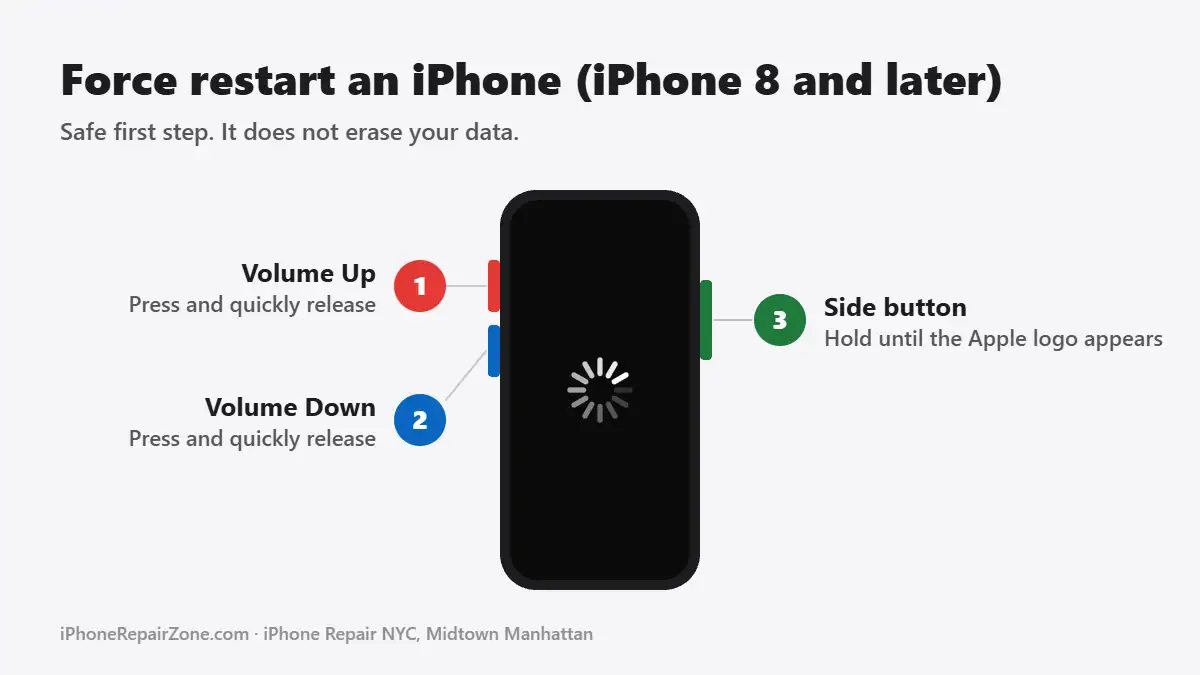
iPhone 8, iPhone SE (2nd generation) and later, including iPhone 17:
- Press and quickly release the volume up button.
- Press and quickly release the volume down button.
- Hold the side button. Let go when the Apple logo appears.
iPhone 7 and 7 Plus: hold the volume down button and the Sleep/Wake button together. Release both when the Apple logo appears.
iPhone 6s and earlier: hold the Home button and the Sleep/Wake button together. Release both when the Apple logo appears.
Apple lists these steps in its official force restart guide. If the phone starts normally, everything is fine. If it goes back to the logo, try the next fix.
Fix 2: Charge It for at Least 30 Minutes
A nearly empty battery can stop an iPhone from finishing its startup. As a result, it may freeze on the logo or restart over and over. Plug it into a wall charger with a cable you trust. After that, leave it alone for at least 30 minutes and try a force restart again.
Does the phone only charge when the cable sits at a certain angle? Then the port may be the real problem. In that case, see our iPhone charging port repair page.
Fix 3: Use Recovery Mode and Choose Update
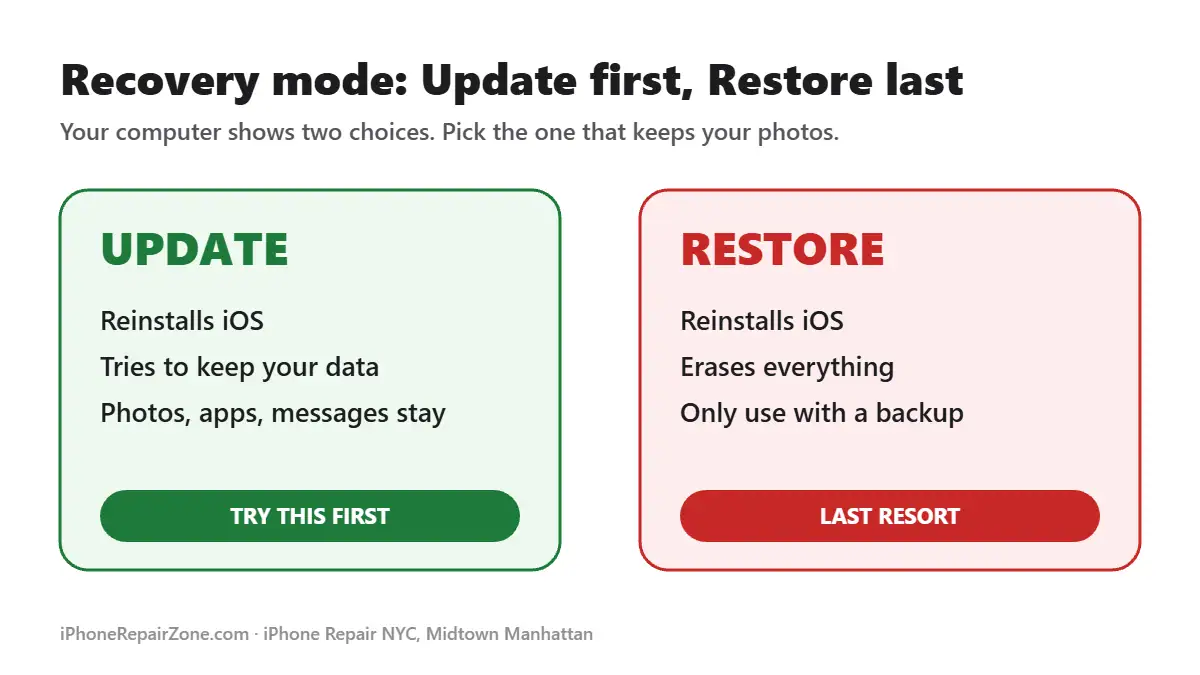
If a force restart does not help, recovery mode is the next step. It lets a computer reinstall iOS. Most importantly, the Update option tries to keep your photos, messages and apps.
- Connect your iPhone to a Mac or a Windows PC with a USB cable.
- On a Mac, open Finder. On Windows, open the Apple Devices app or iTunes.
- Press and release volume up. Next, press and release volume down.
- Now hold the side button. Keep holding it, even when the Apple logo appears, until you see the “Connect to computer” screen.
- When your computer shows Update or Restore, click Update.
The download can take a while. If it takes more than 15 minutes, the iPhone may leave recovery mode. If that happens, let the download finish and repeat the button steps. Apple explains the full process in its recovery mode support article.
Fix 4: Restore Only as a Last Resort
If Update fails, the computer can Restore the iPhone. However, a restore erases everything on the phone. After that, you can only get your data back from an iCloud or computer backup.
So, before you click Restore, ask yourself one question: do you have a recent backup? If the answer is no, stop here. A technician may still be able to get the phone to start, so you can save your photos first.
Why Does an iPhone Get Stuck on the Apple Logo?
Most cases come from one of two places: the software or the hardware.
Software causes
- An iOS update that stopped halfway or failed.
- A restore or a transfer from an old iPhone that did not finish.
- Storage that is almost full, so the system has no room to start.
Hardware causes
- A worn-out battery that cannot deliver enough power during startup.
- Liquid damage, even from rain or a spilled drink days earlier.
- A damaged charging port or flex cable that sends bad signals to the board.
- A hard drop that damaged the logic board or a connector inside.
- A faulty replacement part from a low-quality repair.
When an iPhone Stuck on the Apple Logo Needs Repair
Software fixes work well, but they cannot fix a broken part. These signs point to hardware:
- The boot loop started right after a drop or contact with water.
- Both Update and Restore fail or show an error.
- The iPhone gets warm while it sits on the logo.
- The phone only starts while it sits on the charger.
- A button no longer works, so you cannot enter recovery mode at all.
In these cases, more restarts will not help. Instead, the phone needs a proper diagnosis. For example, an iPhone battery replacement often solves a weak battery. Liquid damage, on the other hand, needs a cleaning and a board check through our iPhone water damage repair service.
Fix an iPhone Stuck on the Apple Logo in Midtown Manhattan
Is your iPhone still stuck on the Apple logo? Bring it to iPhone Repair NYC at 10 E 39th St, Suite 903, between Fifth and Madison Avenues. We are a short walk from Bryant Park and Grand Central.
- Free diagnostics before any repair.
- Data first: we try the data-safe options before anything that could erase your phone.
- Walk-ins welcome, no appointment needed.
- Hours: Mon–Fri 8:00 AM–7:30 PM, Sat–Sun 9:00 AM–7:30 PM.
See all of our iPhone repair services in NYC, or contact us before you visit. You can also call us at 646-698-2228.
Frequently Asked Questions
Will a force restart delete my data?
No. A force restart only restarts the iPhone. Your photos, messages and apps stay on the phone.
How long should I wait before I try to fix it?
If you see a progress bar, wait at least one hour. If the logo sits there with no progress bar for several minutes, start with a force restart.
Does recovery mode erase my iPhone?
Not if you choose Update. Update reinstalls iOS and tries to keep your data. Only Restore erases the iPhone.
Can a bad battery cause an iPhone to get stuck on the Apple logo?
Yes. A worn battery may not supply enough power during startup. As a result, the iPhone can freeze on the logo or restart in a loop.
Can you fix an iPhone stuck on the Apple logo the same day?
We can often fix many causes, such as a worn battery or a damaged charging port, on the same day. Board-level problems may take longer. We will tell you after the free diagnosis.
Related guides: Face ID not working after a drop · iPhone black screen repair
iPhone, iOS and Apple are trademarks of Apple Inc. iPhone Repair NYC is an independent repair shop and is not affiliated with Apple.
